


You might suddenly notice that your iPhone’s charging port looks dusty after unplugging the cable. Pocket debris and dust tend to accumulate in the port and go unnoticed when a person enters the port daily. A safe cleaning of the iPhone charging port assists in regaining reliable charging of the phone. In this article, we will discuss how to clean iphone charging port.
Importance of Cleaning Your iPhone Charging Port

Proper cleaning of your iPhone's charging port is vital in ensuring quality charging and extending the battery life. Proper contacts between the cable and the port might be blocked by debris accumulation. This tends to slow the pace of charging or termination. Consistent cleaning will prevent internal damage and charging failure. A clean port makes the flow of power stable and prevents damage to the battery.
Tools and Materials Needed for Safe iPhone Charging Port Cleaning
Before you know how to clean charging port on iPhone, the right tools are important. With appropriate equipment, you can clean safely and also preserve your iPhone's charging port against unintentional damage. Such as:
1. Soft Brush or Toothbrush
A soft brush easily removes dirt without scratching the inside parts. Light pressure and slow movements ensure the removal of debris, but keep connectors intact on the inside.
2. Compressed Air Can
Compressed air is used to dislodge loose material in the port. Also, during cleaning sessions, use short bursts and hold the can straight to ensure that it does not release moisture.
3. Cotton Swabs
The residual near the port opening can be cleaned carefully with cotton swabs. Apply a low amount of force and stroke to remove dirt without scraping dirt onto the inside of the charging port.
4. Microfiber Cloth
The microfiber cloth will clean the charging port and cable tip in a safe manner. It eliminates dusty surfaces with no debris left behind.
5. Isopropyl Alcohol
Isopropyl alcohol assists in the removal of stubborn grime and bacteria in the port in a safe manner. Put a little on a cotton swab and rub gently with patience when performing some tasks of deep cleaning occasionally.
Step-by-Step Guide to Clean Your iPhone Charging Port
This is how to clean iPhone charging ports in a safe way.
1. Power off Your iPhone
Always switch off your iPhone fully before cleaning to avoid electrical hazards and other accidental damage. Switching off helps in the safety of internal parts. Allow some time to elapse after switching off before handling the charging port. This ensures safer handling.
2. Inspect the Charging Port
Use sufficient light to check the charging port and determine the presence of dust or lint. Gently tilt the phone in order to view inside in a clear manner. Close observation assists in identifying the extent of debris involved before initiating the cleaning work. This will eliminate excessive force.
3. Use a Soft Brush or Toothbrush to Remove Debris
Loosen the debris of the charging port opening with a soft brush. Go very soft with slight pressure in order to prevent any scratches. Clean it outwards in order to have dirt getting out of the port rather than into the interior. Continue until residual debris is cleared safely.
4. Blow Away Dust with Compressed Air
Grab the compressed air cylinder and press the short, powerful blasts on the port. This technique loosens any dust remnants but does not contact delicate internal connections. Be careful and do not keep on spraying when cleaning.
5. Wipe the Area with a Dry Microfiber Cloth
Wipe the exterior of the charging port with a clean, fine fiber cloth. This eliminates spill dust in the area of the opening. It also cleans the tip of the cable in order to improve the quality of the connection. The use of clean hands will aid in eliminating further dirt transfers during this process.
6. Allow the Port to Dry
Keep the charging port dry and then reconnect the cables. The drying period averts any problem of moisture. Wait several minutes, leave the phone in an open place where it can be well ventilated. This tolerance eliminates internal component breakage as well as corrosion threats.
7. Test Your iPhone
Clean and afterwards turn the iPhone on and connect the charging cable. Verify stable charging and connection. A successful charge will ensure that the port is healthy and operational. In case of difficulties, seeking professional help would be a good idea.
What Are the Most Common Mistakes When Cleaning Your iPhone?

Now you know how to clean out iPhone charging port, but knowing the common mistakes is beneficial to save your iPhone and its charging performance. Such as:
Applying Too Much Pressure
Putting an overstrain may cause sensitive charging port connections to bend. This destruction can result in loose contacts and irreparable charging complications.
Using Liquid Cleaners
Internal parts can easily take on liquid cleaners. An exposure to moisture can also lead to corrosion and severe electrical issues.
Using the Wrong Cloth
Paper towels or rough clothing may leave residual fibers. Such fibers tend to obstruct connections and lower charging efficiencies.
Tips to Keep Your iPhone Charging Port Clean
There are simple tips to follow in order to make sure your iPhone's charging port is clean and free of debris. Such as:
1. Use Wireless Charging to Protect Your Port
Wireless charging reduces the physical damage to the charging port on your iPhone. It reduces dust access as well as minimizes frequent cable insertion. Using a wireless charger helps maintain long-term port stability and charge stability.
To secure your iPhone charging port, you can choose INIU SnapGo W31-E1 3-in-1 Magnetic Foldable Wireless Charger. It provides rapid Qi2 wireless charging of iPhones and other Apple gadgets. It is foldable so that it can be easily used and carried around daily.
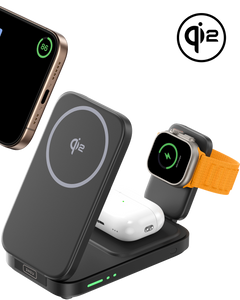
To be more flexible, the INIU SnapGo P73-E1 Wireless Charger with Stand is one of the best wireless chargers for iPhone. It is a small 10000mAh wireless power bank with a magnetic charge pad. It provides 15W Qi2 wireless output and doubles up as a hands-free stand, ideal in terms of desk or travel charging.

2. Use a Charging Port Protector
A charging port protector is used to ensure that dust and lint do not get into your iPhone. It eliminates accumulation and decreases the cleaning rate. This mini accessory maintains steady connections and maintains long-term charging performance.
Extra tips: Using reliable charging accessories also helps prevent wear and strain. INIU Cougar P63-E1 Power Bank has a built-in premium USB-C cable to charge reliably and is also portable for easy on and go. This combination ensures that your device is smoothly charged anywhere and limits port wear and cable strain.

3. Regularly Check Your Charging Port
Check your iPhone charging port once a week. Search for dust, lint, or foreign particles. Early detection will avoid build-up and allow reliable charging output.
4. Avoid Dusty or Dirty Environments
Do not leave your phone in dusty or dirty places. You should not put it on the floor or even in close proximity to food. The practice safeguards the port and eliminates excessive cleaning requirements.
FAQ
1. How do I clean my iPhone's charging port with a toothpick?
Switch off your iPhone without starting. Wipe dust away with a toothpick. Move at a slow pace and be careful not to break the fragile connectors of the port.
2. How to fix the iPhone port not charging?
Look at your charging port beforehand to see whether it is dirty or has lint. Clean it gently if needed. Use another cable or charger, and in case the issue persists, get the professional repair service. Also, avoid using low-quality or unbranded charging cables and chargers. They may damage the port or reduce charging efficiency over time.If you're looking for a hassle-free alternative, wireless charging works efficiently to minimize wear on the charging port
3. What is the duration of a charging port's lifespan?
An iPhone charging port can serve for several years when well-maintained. Its lifespan can be greatly reduced by frequent debris and rough handling. The frequent maintenance maintains its reliability.
4. How much does it cost to get an iPhone charging port cleaned?
Professional cleaning ranges between $20 and $50. The cost differs when it is in need of extra repairs due to damage or deteriorated parts.
Conclusion
Now you know how to clean iphone charging port. Frequent inspections avoid the accumulation of dust and garbage. Safe cleaning maintains the inside components to be safe. A port protector or a wireless charger both limit wear. These tricks prolong your iPhone's lifespan. You will be able to charge daily without any issues.
