


A non-functional charger can indeed ruin your day, especially when your current task depends on your phone, laptop, or tablet. If you ever find yourself asking, “Why is my charger not working?” The only way to save yourself from wasting time and frustration may be to know how to fix your charger.
This article will discuss the common causes of chargers not working, and the fact that causes could involve broken cables to incompatibility, and we will present easy ways of restoring it to allow you to be on track again.
Common Reasons Your Charger Isn’t Working

Issues of charging are prevalent and may be occasioned by a number of factors. The most common causes of non-functioning of your charger are these:
Damaged Charging Cable
Damaged cables are a top reason for charging problems. Cables tend to tear, bend, or break when they are in constant use. Even if the outer sheath appears intact, internal damage can obstruct stable current transmission.
Dirty Charging Port
Another reason could be a dirty or blocked charging port on your device. Stuff like lint, dust, or any other debris can settle in the port, preventing even a portable charger from fitting properly.
Defective Charger
Another common cause is faulty chargers. This may happen from wear and tear or charger overheating. Output voltage may become unstable or drop to zero, which prevents the delivery of necessary energy to the device. Symptoms include abnormal heat during operation or intermittent interruptions to the charge.
Charger Compatibility Problems
Chargers are not always compatible with all devices. A low-watt charger or a charger of an inappropriate voltage may never properly charge your device. Most of the devices demand a charger for fast charging. If you have compatibility problems, it can be recommended that you spend money on a device-specific charger. An example is the INIU A11-E1 100W GaN Charger, which is a perfect fit as it supports both PD2.0 and PD3.0, along with automatically scaling its power production to the needs of your device.

Battery Issues
Sometimes, the issue lies with the device’s battery itself, not the charger. It’s an aging battery that loses capacity over time, leading to quick drain or trouble charging. If your device is not charging properly or has significantly shortened battery life, it is likely a battery problem.
Easy Fixes for Charger Issues
Before you assume the worst or buy a new charger, there are a few simple solutions that can help fix the common charging problems.
Fixing a Damaged Cable
Stop the use of cables with a damaged outer sheath or a loose connector immediately. Do not forget that a good, compatible cable is to be used, which will also guarantee improved performance and stability. The best quality cable to use is always a certified or brand-specific cable.
Cleaning the Charging Port
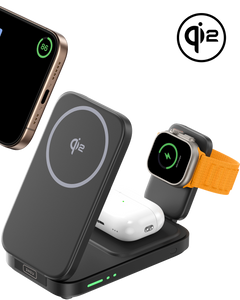
A soft brush can be used to clear out dust or debris in the charging port after power-off. Use no sharp objects, which will be injurious to the port. In the case that it is not possible to clean the port, wireless charging can be a good alternative. INIU SnapGo W31-E1 3-in-1 Magnetic Foldable Wireless Charger and INIU W21-E1 Magnetic Wireless Charger have easy wireless charging without having to touch the charging connector.
Check the Power Source
Connect the suspect charger to a known functional device for a test. Simultaneously, test your device with a separate functional charger. If you confirm a charger failure, replace it with a new unit that has matching output specifications. In case you would like to receive a portable device, you could also use the INIU Cougar P63-E1 Power Bank. Having a 25,000mAh battery, it will serve a great purpose of keeping your gadgets powered at all times, even where you do not find any wall socket.

Handling Battery Issues
You may have to change the battery in case your device cannot be charged or if it is being emptied too fast. Check the health of the battery of the device in the settings. When the battery is no longer able to hold a charge, it can be replaced, and the normal operations will be resumed.
Restart Device
And when you have no charger working, you can start your gadget. Software glitches or background processes will interfere with charging sometimes. These issues are easy to resolve through restarting and you can again use your charger.
Such directions and troubleshooting can assist you in fixing most of the common charging problems without always having to change cables and devices.
When to Seek Professional Help

When the above options have not succeeded, then perhaps it is time to bring in the expert.
Basic Fixes Don’t Work
If replacing the cable, cleaning the port, and checking the power source don’t help to correct the problem, a possible problem might have occurred. It can be a faulty charging circuit or an internal problem that should be fixed by a professional.
Overheating Occurs
In case the charger or other device overheats during any charge, that may be a symptom of a fault. Excessive heat can be generated due to low-quality components or internal damage. To prevent the same, it is better to use chargers that have Gallium Nitride (GaN) technology, such as INIU A12-E1 Dual Port Charger, which produces less heat and is less likely to cause harm to the users.
Signs of Battery Swelling
The problem of a swollen battery is a great danger. In case you start noticing how fat or overinflated your battery becomes or that the back of what you have is becoming swollen, cease using it. A swollen battery is prone to additional damage and may even pose a risk. When this happens, a replacement of the battery by an expert is indispensable.
Tips for Extending Charger Lifespan
In order to get the best out of your charger, use it in mind.
Inspect Cables Regularly
Examine your charging cables; they should not be worn out, frayed, or bare. Damaged cables should be replaced early enough before they cause any managerial trouble in the future.
Use Compatible Accessories
Always ensure that you use the compatible chargers and cables. Improper usage of a charger will reduce the rate at which the charging process works and, in the end, wear out your device.
Store Chargers in Cool Places
One of the largest foes of charging equipment is heat. Do not keep your chargers in humid places where they can become hot and hence wear out easily. You should not leave your chargers in the sun or areas where they may be hot because they might end up destroying the inside parts.
FAQ
How do I charge my phone without a charger?
Your phone can be charged with a power bank, wireless charger or USB charger port on your computer. Devices are also capable of charging in reverse fashion with one phone being in a position to charge another.
Do iPhone chargers go bad?
Admittedly, the iPhone chargers may deteriorate with time, and they may also be bent and damaged when exposed to frequent use. When your charger is not working correctly, then perhaps you should replace the charger.
Is it worth fixing an iPhone charging port?
In case the charging port is the only cause of the problem and there is no terrible damage, one can have a chance to repair it. But when the destruction is so severe, then it may turn out to be cheaper to dispose of the equipment.
Conclusion
Conclusively, the problem of chargers is caused by different factors that may include damaged cables, dirty ports, or compatibility issues. The majority of these problems are resolved without much troubleshooting. You must contact a professional in case of a simple troubleshooting failure, overheating, or battery enlargement. The above tips and tricks will help you ensure a long life of your charger and an uninterrupted operation of your devices by keeping your charging devices in good condition.
