


iPhone wireless charging is often reduced to a simple "snap-and-charge" experience, but beneath that convenience lies a sophisticated ecosystem of inductive protocols and thermal management systems. Many users assume that if a charger fits magnetically, it must charge at full speed. In reality, performance is dictated by a layered system of hardware standards and software-level "handshakes" that Apple has refined over nearly a decade.
From the iPhone 8 to the cutting-edge iPhone 17 series, Apple has evolved wireless charging through four major stages:
- Qi (Baseline): The open inductive standard for all compatible devices.
- MagSafe: Apple’s proprietary Magnetic Power Profile (MPP).
- Qi2: The industry-wide magnetic standard (MagSafe-based) introduced to unify the ecosystem.
- Qi2.2: The 2026 high-wattage standard enabling speeds up to 25W.
Understanding these differences and the software updates required to unlock them is essential if you want to find the best wireless charger for iPhone or a high-efficiency best magnetic power bank for iPhone without falling into performance traps.
Which iPhones Can Charge Wirelessly?

Every flagship iPhone since the 2017 iPhone 8 and iPhone X supports inductive charging. However, iPhones with Wireless Charging are categorized into three distinct performance tiers:
1. The Legacy Qi Tier (iPhone 8 – iPhone 11)
These models rely on the basic Qi standard without magnetic assistance.
Technical Constraint: Capped at 7.5W by Apple's software to prevent excessive heat in non-aligned setups.
Engineering Reality: Without magnets, efficiency depends entirely on manual alignment. A 2mm displacement can result in a 50% drop in speed and significant heat accumulation.
2. The Magnetic Transition Tier (iPhone 12 – iPhone 14)
This era introduced the first iteration of Apple’s Magnetic Power Profile (MPP).
Key Update: While these models launched with MagSafe, they recently received Qi2 support via software updates.
Performance: Up to 15W with MagSafe or Qi2-certified chargers.
3. The High-Speed Qi2 Era (iPhone 15 – iPhone 17)
The current gold standard for iphone wireless charging efficiency.
iPhone 15: The first to support Qi2 natively out of the box (15W).
iPhone 16 & 17: Optimized for Qi2.2, allowing for 25W peak power when paired with specific high-wattage hardware and suitable software updates.
How Do Different iPhone Series Compare in Wireless Charging?
To maximize your device's battery health, you are suggested to align the charger’s protocol with the iPhone's specific "charging ceiling" and software version.
iPhone Wireless Charging Technical Comparison
|
iPhone Series |
Standard |
Max Power |
Qi2 Support |
Required Software |
|
8 – 11 |
Qi |
7.5W |
No |
Any iOS |
|
12 Series |
MagSafe / Qi2 |
15W |
Yes |
iOS 17.4 or later |
|
13 & 14 Series |
MagSafe / Qi2 |
15W |
Yes |
iOS 17.2 or later |
|
15 Series |
Qi2 (Native) |
15W |
Yes |
iOS 17.0+ |
|
16 & 17 Series |
MagSafe / Qi2.2 |
25W |
Yes |
iOS 26.0+ |
Pro Tip: If you own an iPhone 12, 13, or 14 and feel your "Qi2 charger" is slow, check your Settings. Without the specific iOS updates mentioned above, the phone defaults to the 7.5W "Legacy Qi" speed.
Why Do Many Magnetic Chargers Still Charge at 7.5W?
This is a major point of confusion on tech forums. "Magnetic" does not always mean "MagSafe" or "Qi2."
The Certification Barrier: Apple enforces a 7.5W cap on chargers that lack official MFi (Made for iPhone) or Qi2 certification. Magnetic rings on cheap chargers are often just physical guides, not protocol-compatible hardware.
Power Input Requirements: For the best wireless charger for iPhone to hit 15W, it usually requires a 20W+ USB-C adapter. To hit the new 25W ceiling on iPhone 16/17, you must use a 30W or higher power adapter.
Thermal Throttling: iOS 16 and later include a "Charging on Hold" feature. If the phone's internal temperature exceeds a safe threshold, the software will pause or throttle charging to 5W to protect the battery.
How to Choose the Best Wireless Charger for iPhone?
Step 1: Identify Your Hardware Ceiling
iPhone 16/17 Users: Look for "Qi2.2" or "25W MagSafe" labels. Standard 15W chargers will work, but you'll be leaving 40% of your potential speed on the table.
iPhone 12–15 Users: A standard 15W Qi2 charger is the most cost-effective "best" choice.
Note: Qi2.2 and Qi2 chargers are also backward compatible—meaning they can charge older devices at the maximum charging speed supported by those devices. Therefore, if you want to upgrading your devices in the future, it may be a better choice to opt for a wireless charging device that supports these newer standards.
Step 2: Match the Charger to Your Lifestyle
For the Nightstand: A vertical stand is best for utilizing Apple's StandBy Mode.
For On-the-Go: The best magnetic power bank for iphone should feature sturdy magnets for a secure lock and support high speed wired charging (charging other devices when necessary).
Step 3: Avoid Case Interference
Ensure your case is less than 3mm thick and contains no metal or magnets that conflict with the charger's ring. The iPhone 12 and newer models feature a built-in magnetic ring, so you do not necessarily use a specialized magnetic phone case; you can still wirelessly charge your device using a traditional case.
How to Use iPhone Wireless Charging Safely?

Wireless charging on iPhone is generally safe thanks to multiple layers of hardware and software protection built into modern devices. The real concern is not safety hazards like fire, but thermal efficiency, charging stability, and long-term battery health.
1. Avoid Misalignment Heat from Non-Magnetic Chargers
One of the most common issues with standard Qi chargers is coil misalignment. When the charging coils between the iPhone and the pad are not properly aligned, the system continuously adjusts energy transfer, which leads to unnecessary heat generation and reduced efficiency.
To minimize this:
- Prefer MagSafe or Qi2 magnetic chargers
- Ensure the phone “locks” into position before charging begins
- Avoid generic flat Qi pads for newer iPhone models that support magnetic alignment
Magnetic alignment systems significantly improve energy transfer efficiency by maintaining optimal coil positioning throughout the charging cycle.
2. Ensure Proper Thermal Ventilation During Charging
Wireless charging naturally produces more heat than wired charging due to energy loss during induction. If heat cannot dissipate properly, the iPhone will automatically reduce charging speed to protect the battery.
- To maintain optimal performance:
- Place the device on a hard, flat, and ventilated surface
- Avoid soft materials such as beds, sofas, or pillows
- Do not cover the phone while charging (e.g., under clothing or cases that trap heat)
3. Use a Proper Power Adapter for Stable Input
Wireless charging efficiency is not determined only by the charging pad—it also depends heavily on the power adapter supplying it.
Using low-quality or underpowered adapters (such as old 5W chargers) can lead to:
- Unstable voltage delivery
- Reduced wireless charging speed
- Frequent thermal throttling
- Inconsistent charging behavior
To ensure optimal performance:
- Use a USB-C Power Delivery (PD) adapter with sufficient wattage (typically 20W or higher)
- Match the adapter power rating with the wireless charger specification
Top INIU Wireless Charging Solutions
INIU’s wireless charging lineup is designed around three real-world use cases: portable power, desk efficiency, and everyday convenience.
INIU P73 Qi2 10000mAh Wireless Portable Charger
The INIU P73 delivers up to 15W of Qi2 wireless charging power for the iPhone 12 through 17 series. With its slim design and large 10,000mAh capacity, it provides a convenient charging experience for your weekend trips or daily commute.
Why it stands out:
- An ultra-slim profile—just 0.5 inches thick—makes it comfortable to hold while charging.
- Powerful magnetic adsorption ensures precise alignment, maintaining a secure wireless charging connection even while on the move.
- Supports simultaneous charging for up to three devices.
- Features a built-in kickstand design, ideal for hands-free video viewing and video calls on a desktop.
Best for users who:
- Traveler and commuter
- Use navigation, streaming, or hotspot heavily
- Minimalist

INIU SnapGo Air 10000mAh Qi2.2 Magnetic Power Bank
The SnapGo Air 10000mAh incorporates the latest Qi2.2 wireless charging technology, capable of delivering up to 25W of wireless power to compatible devices. It was designed with a single, clear objective in mind: to enable effortless and convenient daily charging—devoid of any unnecessary bulk or hassle. Its slim profile makes it ideal for both travel and everyday carry. Furthermore, it supports 45W wired charging, allowing it to provide fast charging capabilities for other devices.
Why it stands out:
- Ultra-portable slim design that fits naturally in pockets or small bags
- Strong magnetic attachment ensures stable charging while walking or commuting
- Clean, minimal design that matches modern iPhone aesthetics
Best for users who:
- Commute daily
- Prefer lightweight setups
- Want a “carry-it-everywhere” charging solution
- Users who need the "fastest wireless charging"
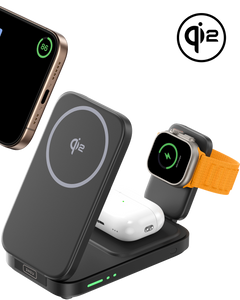
INIU W31 3 in 1 Wireless Charging Station for Productive Desk Environments
The INIU W31 is a 3 in 1 wireless charging station designed for organized desk and bedside use. It allows users to simultaneously charge an iPhone, Apple Watch, and AirPods, making it ideal for those who own a complete set of Apple devices.
Why it stands out:
- Stable stand design supporting vertical phone positioning
- Enables charging while using iPhone for video calls, streaming, or StandBy mode
- Helps reduce cable clutter and improves desk organization
- Designed specifically for multi-device users.
Best for users who:
- Work or study at a desk for long periods
- Use their phone as a secondary display
- Prefer a clean, structured charging setup
INIU SnapGo W31-E1 Qi2 15W 3 w 1 magnetyczna składana ładowarka bezprzewodowa
INIU W21 Reliable Qi2 Wireless Charger for Everyday Basics
The W21 is a Qi2 wireless charging stand capable of delivering wireless charging speeds of up to 15W to compatible devices. Its detachable charging pad significantly enhances its convenience; users can utilize it as a stand or hold it in their hand, making it an ideal solution for desktop charging.
Why it stands out:
- Straightforward Qi2 wireless charging experience
- Compact design suitable for bedside or basic desk use
- Flexible use: handheld or mounted on a stand
Best for users who:
- Frequently charge phone on desk or bedside table
- Occasionally use the phone while it is charging

FAQ
Which iPhones can charge wirelessly?
All models from iPhone 8 to the current iPhone 17 series. However, the wireless charging speeds they support and the wireless charging standards they accommodate vary.
Why is my iPhone 13 charging slowly on a magnetic charger?
Ensure you have updated to at least iOS 17.2. Without this update, your phone will not recognize the Qi2 protocol and will stay at 7.5W.
Is it safe to charge my iPhone wirelessly overnight?
Yes. iPhones use Optimized Battery Charging to learn your routine and wait to finish charging past 80% until you need it, minimizing battery wear.
Final Takeaways
The evolution of iphone wireless charging has reached a peak in 2026 where wireless speeds finally rival wired. However, the "best" experience is no longer just about the hardware—it is about Software + Hardware + Certification. By ensuring your iOS is updated and your charger is Qi2 or MagSafe certified, you ensure the fastest, coolest, and safest charge for your device.
