


Wireless charging is one of the most convenient features of new smartphones, letting you power up without plugging in cables. However, many users still face issues like "why is my wireless charger not working?" or "why iPhone wireless charging not working even though it briefly shows the charging icon?".
This guide will walk you through the most common causes and real, practical fixes while explaining how wireless charging works and addressing battery health concerns.
Why Is My Wireless Charger Not Working? The Most Common Reasons

When a wireless charger fails, the issue is rarely random. Below are the most common reasons of wireless charger not working and the reliable, real-world solutions backed by industry guidance and user diagnostics.
Coil Misalignment Between the Phone and Charger
Wireless charging relies on electromagnetic induction. The transmitter coil in the charger and the receiver coil in your phone must be closely aligned. If the coils are offset, energy transfer becomes inefficient or stops entirely.
Even a small shift — caused by a camera bump, vibration, or uneven surface — can interrupt charging.
How this shows up for users
- Charging starts, then stops after a few seconds
- Charging only works in a very specific position
- Charging fails when the phone is slightly moved
Reliable solutions
- Place the phone flat and centered on the charging surface
- Avoid charging on unstable or slanted surfaces
If alignment is difficult, consider magnetic wireless chargers (Qi2 / MagSafe-style), which physically guide the coils into the optimal position and significantly reduce misalignment errors
Coil alignment issues are consistently identified as the number-one cause of wireless charging instability.
Phone Cases or Accessories Blocking Power Transfer
Wireless power weakens rapidly with distance. Thick phone cases, metal components, magnetic plates, wallet attachments, or RFID cards increase the gap between coils or disrupt the magnetic field entirely.
Common culprits
- Thick protective cases
- Metal kickstands or magnetic rings
- Wallet cases with cards inside
- Decorative metal inserts
Reliable solutions
- Remove the phone case and test charging directly
- If charging works without the case, switch to a Qi-compatible (or Magsafe-compatible), thin, non-metal case
- Avoid cases that add metal between the phone and charger
Many chargers are designed to tolerate standard cases, but metal or excessive thickness remains a primary cause of charging failure. Taking INIU's Qi2 wireless chargers as an example, they are generally compatible with phone cases (non-metallic materials) with a thickness of up to 4mm.
Insufficient or Unstable Power Input
A wireless charger does not generate power on its own — it passes through whatever power it receives. If the wall adapter or cable cannot supply stable voltage and current, the charger may fail to start or repeatedly reset.
Signs of power input issues
- Charger LED blinking or flashing
- Charging starts but immediately stops
- Very slow charging or no response
Reliable solutions
- Use a high-quality wall adapter that meets the charger's rated input (typically 18W–30W for fast wireless charging)
- Replace low-quality or damaged USB cables
- Avoid plugging wireless chargers into low-power USB ports (such as laptop USB-A ports)
Power input problems are frequently misdiagnosed as "charger defects," but are often resolved by upgrading the adapter or cable. Some brands include adapters and charging cables with their wireless chargers. Please pay attention to the included accessories when purchasing, and it's best to use the accessories provided. For example, the INIU W31-E1 3-in-1 wireless charger comes with a 30W power adapter and a USB-C charging cable, allowing it to charge at its best.
Overheating and Thermal Protection Shutdown
Wireless charging generates more heat than wired charging due to energy loss during induction. When temperatures exceed safe thresholds, phones automatically pause or stop charging to protect the battery and internal components.
Situations that increase heat
- Fast wireless charging
- Warm rooms or direct sunlight
- Heavy phone usage (gaming, navigation) during charging
- Thick cases trapping heat
Reliable solutions
- Allow the phone and charger to cool before resuming charging
- Remove the case during wireless charging
- Avoid placing chargers near heat sources
- Use chargers with better airflow or thermal design
Thermal protection is a deliberate safety feature, not a malfunction. Persistent overheating should be treated as a usage or environment issue rather than a hardware fault. Today, major brands like INIU are constantly improving wireless charging technology, and the new Qi2 and Qi2.2 wireless charging standards have made further optimizations to address overheating issues.
Foreign Object Detection (FOD)
Modern Qi chargers include foreign object detection to prevent overheating caused by unintended metal objects absorbing energy. If a charger detects something unusual, it may refuse to charge or flash warning lights.
Common triggers
- Coins or keys on the charging pad
- Metal rings or accessories attached to the phone
- Debris or dust buildup
Reliable solutions
- Clear the charging surface completely
- Clean both the charger and phone back regularly
- Avoid placing phones with metal attachments on wireless chargers
Device Compatibility or Charging Standard Limitations
Not all devices support the same power profiles and even some models do not support wireless charging. Some wireless chargers only deliver standard Qi power levels, while newer phones expect higher-efficiency or magnetically aligned standards such as Qi2 and Qi2.2. Additionally, some phones limit charging speeds on non-certified chargers.
Reliable solutions
- Confirm the charger supports your device's wireless charging standard
- For iPhones, prefer Qi-certified or Qi2-compatible chargers. Generally speaking, iPhone 12-17 series models support Qi2 15W wireless charging; while the iPhone 17 series supports up to 25W Qi2.2 wireless charging.
- Avoid very old or uncertified wireless chargers with modern phones
Compatibility issues are subtle but common, especially as wireless charging standards evolve.
Software or Firmware-Related Issues
Wireless charging behavior is managed partly by the phone's operating system. After system updates, bugs or changed thermal rules can temporarily affect charging performance.
Reliable solutions
- Restart the phone
- Install the latest system updates
- Test charging with another wireless charger to rule out hardware failure
How Does Wireless Charging Work?
At its core, wireless charging works through a principle called electromagnetic induction. Inside every wireless charging pad is a transmitter coil that generates an alternating magnetic field when powered. When a compatible device comes into close contact, the receiver coil inside the phone captures this magnetic energy and converts it into electrical current, which is then used to charge the battery. This process happens automatically and safely, but it is inherently more sensitive than wired charging because energy is transferred through a magnetic field rather than a physical connection.
For wireless charging to work reliably, the transmitter coil in the charger and the receiver coil in the phone must be positioned very close to each other and remain properly aligned. If the distance between the coils increases, the efficiency of energy transfer drops sharply. In these situations, charging may slow down, start and stop intermittently, or fail altogether.
iPhone Wireless Charging Not Working: iOS-Specific Factors
Wireless charging on iPhones is closely tied to both hardware standards and iOS behavior. iPhone 12 and newer models support magnetic wireless charging through Apple's MagSafe system and, with recent iOS updates, also support the Qi2 wireless charging standard, which improves alignment and charging stability when used with compatible chargers. This means most modern iPhones no longer rely on manual positioning alone, but still require proper magnetic alignment and Qi2-certified accessories for best results.
That said, iOS plays an important role in managing wireless charging. System updates can adjust charging negotiation, thermal limits, or power output, which may temporarily affect charging performance. Features like thermal protection and Optimized Battery Charging may slow down or pause wireless charging to reduce heat and protect battery health. If iPhone wireless charging is not working reliably, keeping iOS up to date, removing thick or non-magnetic cases, and using Qi2-compatible magnetic chargers usually resolves the issue.
Is Wireless Charging Bad for Battery Health?

The short answer is no — wireless charging itself is not harmful to your battery. The real factor that affects battery health is heat. Because wireless charging transfers power through electromagnetic fields rather than a direct cable connection, it is generally less efficient and can generate more heat, especially during fast wireless charging or in warm, poorly ventilated environments.
Over time, consistently high temperatures can accelerate battery aging, regardless of whether the phone is charged wirelessly or with a cable. This is why smartphones are designed to slow down or pause charging when they detect excessive heat. Features such as Optimized Battery Charging on iPhones are specifically intended to reduce long-term battery stress by managing charging speed and timing. When wireless charging is used in moderation, with proper airflow, good alignment, and a well-designed charger that manages heat effectively, it remains a safe and convenient option for everyday use.
Step-by-Step Wireless Charging Troubleshooting Checklist
Here's a practical guide you can follow when your wireless charger is not working:
Basic Setup Checks
Ensure solid power input: Make sure your charging pad is connected to a high-quality power adapter (18 W or higher recommended).
Test the charger with another phone: This identifies whether the issue is with the charger or the phone itself.
Switch cables and adapters: A bad cable can interrupt power delivery entirely.
Alignment and Interference
Reposition your phone carefully: Slide it around slowly on the pad until the charging indicator appears.
Remove the case: Especially thick, metal, or magnetic cases can block charging.
Check for foreign objects: Dust, coins, or cards between the device and charger can interfere with power transfer.
Cooling and Software
Let your phone cool down: If the phone is hot, remove it and wait a few minutes.
Restart and update: A firmware or OS update can resolve odd glitches, particularly on iPhones.
Last-Resort Tests
Try a different wireless charger: If another charger works, your original pad might be faulty.
Contact support if hardware is suspected: If none of the above fixes work, it may be a deeper hardware issue.
Suggestions for the Best Magnetic Wireless Chargers
Choosing a well-designed wireless charger that embraces modern standards and solid thermal management can help minimize many of the common issues described above.
Here are some INIU products that use Qi2 / magnetic alignment or robust Qi implementations to address typical problems like misalignment and heat buildup while still providing broad device compatibility and safety features:
INIU Snapgo P73-E1 Wireless Charger Qi2 15W 10000mAh MagSafe Powerbank
This portable power bank support Qi2 magnetic alignment that helps phones lock into the optimal charging position and reduces misalignment frustration. Its slim design makes it easy to carry, making it ideal for travel and commuting.

INIU W31-E1 Qi2 15W 3-in-1 Wireless Charger
This 3-in-1 wireless charging station offers magnetic alignment for iPhone, Apple watches and AirPods, good for desk or bedside setups.
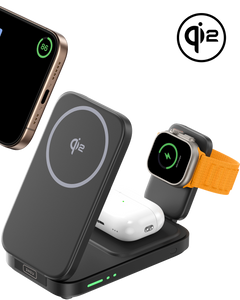
INIU SnapGo W31-E1 Qi2 15W 3 w 1 magnetyczna składana ładowarka bezprzewodowa
INIU V11-E1 Wireless Car Charger Mount
This wireless car charger supports Qi2 wireless charging and can provide 15W wireless fast charging for iPhone 12 and later models. It features fan cooling and a sturdy clamp design, allowing you to enjoy stable and safe charging in car.
These chargers follow Qi2 standards, reducing the need for precise manual alignment and easing heat management.

Final Thoughts
Almost all issues with wireless chargers boil down to a few core factors:
- Coil alignment and interference
- Inadequate power input or cables
- Heat and thermal shutdown
- Software/firmware oddities
Understanding how wireless charging works helps you diagnose problems quickly and choose devices that minimize frustration. Modern standards like Qi2 and Qi2.2 make things easier by guiding alignment and improving efficiency.
With the steps and insights above, you may be well-equipped to troubleshoot and fix common wireless charging problems effectively and know when it's time to try a better-designed charger or get expert help.
